ISI/BIS Check: Verify Helmets, Chargers & Appliances in 2 Minutes
ISI/BIS Check: Helmets, Chargers & Appliances
Buying a helmet, phone charger, mixer, or geyser? A quick ISI/BIS check can literally save your life (and your warranty). This guide shows you—step by step—how to confirm if a product is genuinely certified, spot fakes, and raise a complaint that actually moves.
🧭 Summary
-
Outcome: Confirm a product’s ISI licence (CM/L) or CRS Registration (R-number) in under 2 minutes using the BIS CARE app.
-
Timelines: Checks are instant; complaints via BIS/NCH usually get an initial response in 7–10 days (varies by case).
-
Costs: Verification is free on BIS CARE; complaint filing is free.
-
Docs: Note the CM/L or R-number, brand, model, MRP label, purchase bill, and photos of the mark/packaging.
-
Top pitfall: Buying “ISI-like” marked goods without a licence number—very often fake. Verify before paying.
🧰 Before you start
Who this is for: Indian consumers buying safety-critical items (helmets, electrical appliances) or electronics (chargers, adapters, power banks, laptops, LED lamps).
You’ll need:
-
Product in hand (or seller listing)
-
Licence/Registration number printed on product/box:
-
ISI scheme: CM/L-xxxxxxx (7 digits) + relevant IS standard (e.g., IS 4151 for helmets)
-
CRS scheme (electronics): R-xxxxxxxx (Registration number) + IS reference (e.g., IS 13252 (Part 1))
-
-
Your purchase invoice (for complaints)
Where to do it: -
BIS CARE mobile app (Android/iOS) to verify ISI/CRS and to lodge complaints. BIS+2Google Play+2
-
BIS online portals to cross-check licence/registration status and compulsory lists. BIS+3Manak Online+3CRS BIS+3
Quick note: BIS operates two big buckets—Scheme I (ISI Mark) for many safety/consumer goods, and Scheme II (CRS) for electronics/IT goods (self-declaration with BIS registration). Some products are compulsory by government orders. BIS+2BIS+2
🔟 Steps (do this now)
1) Find the mark and number on the product/box
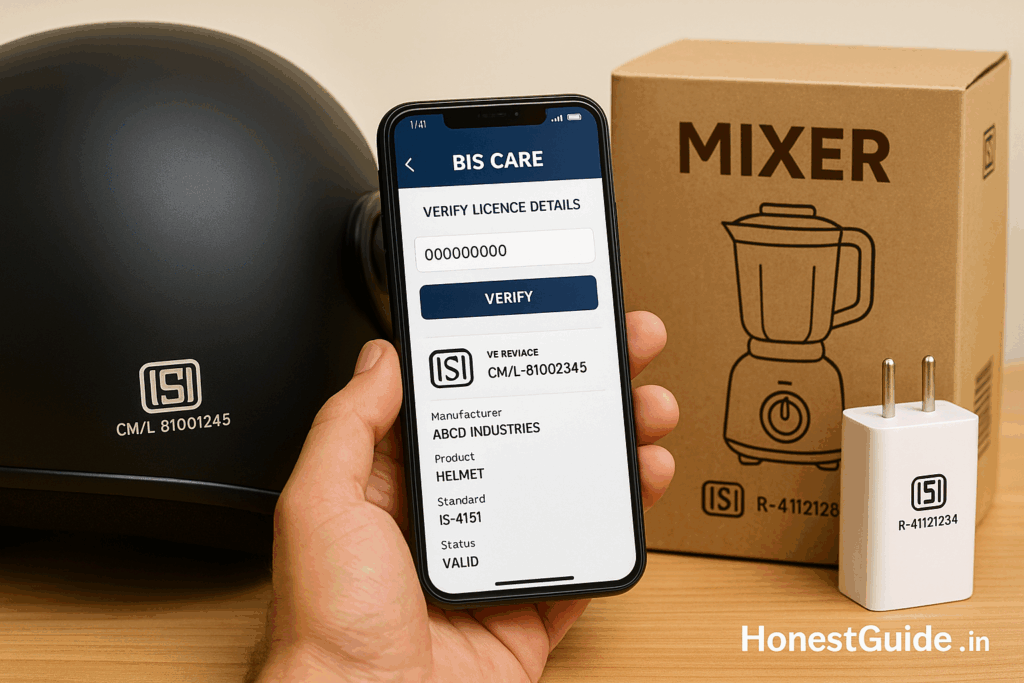
Look for ISI (with the CM/L-xxxxxxx near it) or R-number for electronics. Absence of a number beside the logo = suspect. For helmets, also note IS 4151. BIS+1
Tip: Beware phrases like “As per IS…” without a licence number—often fake. BIS
2) Open the BIS CARE app
Install and open BIS CARE. Choose “Verify Licence Details” for ISI or “Verify Registration (CRS)” for electronics. BIS+1
3) Enter the CM/L (ISI) or R-number (CRS)
Type the exact number from the product/box and submit. You should see manufacturer name & address, product category, standard, brand, scope, and status/validity. Google Play
4) Match brand + model + standard
Ensure the brand and product type/model shown in BIS CARE matches what’s in your hand. For helmets, the relevant standard should be IS 4151. For phone/laptop chargers, you’ll usually see IS 13252 (Part 1) or other notified IS. BIS+1
5) Cross-check on the web portal (optional but strong)
-
ISI licences: Use Manakonline “List/Status of Licence” to confirm current status (active/expired/stop marking).
-
CRS products: Use CRS-BIS “Products under CRS / search” lists. Manak Online+1
6) Confirm it’s a compulsory category (where relevant)
Some products must be certified/registered before sale (e.g., helmets, many household electricals, a long list of electronics). If your item sits in those lists, walk away if verification fails. BIS+2BIS+2
7) Inspect physical cues
Check spelling, logo clarity, CM/L or R-number legibility, and packaging quality. Fake goods often miss the number, use wrong fonts, or print “conforms to IS…” but no licence. BIS
8) Keep an evidence bundle
Click screenshots of BIS CARE results, the mark & number on product, invoice, and seller listing/chat. You’ll need these if you complain. (BIS complaint channels: BIS CARE or Consumer Engagement Portal.) BIS
9) If verification fails—don’t buy (or return immediately)
Ask the seller to show a valid CM/L or R-number and verify it on the spot. If they refuse or it doesn’t validate, do not proceed.
10) File a complaint (if you already bought it)
Use BIS CARE → Complaint (or BIS Consumer portal). You can also lodge a grievance with the National Consumer Helpline (NCH 1915 / 1800-11-4000 / WhatsApp 8800001915) for seller issues/refund. BIS+2Consumer Helpline+2
📋 Checklist (copy-paste)
-
Locate ISI (CM/L-xxxxxxx) or CRS R-number on product/box
-
Note the IS standard (e.g., IS 4151 for helmets; IS 13252 (Part 1) for many chargers/laptops)
-
Verify on BIS CARE (result must show correct brand/product/status)
-
(Optional) Cross-check on Manakonline (ISI) or CRS-BIS lists (CRS)
-
Inspect for fake cues (no number, “as per IS…”, misprint logos)
-
Keep invoice + photos + screenshots
-
If fake/suspect: Don’t buy / Return
-
Complain via BIS CARE / BIS Consumer portal; tag NCH 1915 for marketplace issues
⚠️ Red flags & common mistakes
| Mistake | Consequence | Fix |
|---|---|---|
| Buying “ISI-like” logo without CM/L | High risk, no traceability | Only buy if CM/L verifies on BIS CARE. BIS |
| Trusting “As per IS…” text | Often counterfeit | Look for IS standard + CM/L and verify. BIS |
| Assuming all electronics use ISI | Misses CRS-only goods | For electronics/IT, look for R-number and verify on BIS CARE / CRS-BIS. CRS BIS+1 |
| Not matching brand/scope in result | Wrong product under someone else’s licence | Brand & model must match BIS record. Google Play |
| Not checking compulsory status | Illegal sales slip through | See Products under Compulsory Certification/Registration pages. BIS+1 |
🗣️ Templates & scripts
At the shop (helmet):
“Bhaiya, ISI number please—CM/L on box or shell. It should validate on BIS CARE under IS 4151. Can I check now?”
At the shop (charger/adapter):
“Could you show the **BIS R-number and IS reference on the box? I will verify on BIS CARE before billing.”
Marketplace chat/email (suspected fake):
Subject: Requesting BIS verification for order #{ORDER_ID}
Body:
“Hi, the {product name} delivered on {date} does not show a valid {CM/L or R-number} on BIS CARE. Please process a full refund/replacement with a BIS-verified unit within 3 working days. I have attached screenshots of the product label and the BIS CARE result.”
BIS complaint (summary text in app/portal):
“Purchased {product, brand, model} on {date} from {seller}. Marked as {ISI/CRS} with {CM/L or R-number}, which does not validate / shows expired licence on BIS CARE. Evidence attached: photos, invoice, BIS CARE screenshots. Please investigate and take action.”
🧗 Escalation path (with links)
-
Seller/Marketplace/Brand support — ask for BIS-verified replacement or refund (share BIS CARE screenshot).
-
BIS CARE / BIS Consumer Engagement Portal — register a complaint; BIS’s CMED investigates misuse of mark/registration. BIS
-
National Consumer Helpline (NCH 1915 / 1800-11-4000 / WhatsApp 8800001915) — parallel grievance for refund/return issues with sellers/marketplaces. Consumer Helpline+1
-
If hallmarking/jewellery issues: use BIS hallmarking help/contacts and A&H centres (testing on priority, paid). BIS+1
❓FAQs
1) How do I check a two-wheeler helmet quickly?
Find CM/L and IS 4151 on the helmet/box → open BIS CARE → Verify Licence → enter CM/L → confirm brand/product/status. BIS+1
2) What’s the difference between ISI and CRS?
ISI (Scheme I) is BIS certification with the ISI mark and a licence (CM/L)—used for many safety/consumer goods. CRS (Scheme II) is BIS registration for electronics/IT goods; look for R-number. Some categories are mandatory under government notifications. BIS+2BIS+2
3) Are mobile/laptop chargers covered?
Yes—electronics like chargers/adapters, laptops, LED lamps etc. fall under CRS. Verify the R-number on BIS CARE or via CRS-BIS lists. CRS BIS+1
4) The app shows “expired” or “stop marking”. What now?
Treat it as non-compliant. Don’t buy; if already bought, return and complain via BIS CARE and, for refund/return issues, NCH. BIS
5) The product says “As per IS…” but no number. Is that okay?
No. Without a CM/L (for ISI) or R-number (for CRS), it’s not verifiable and likely non-compliant. BIS
6) Where can I see the whole list of compulsory categories?
See “Products under Compulsory Certification” (ISI) and CRS lists on BIS websites. BIS+1
7) Can I verify by brand name instead of number?
Number is fastest. For deeper checks, you can browse Manakonline → List/Status of Licence (ISI) and CRS-BIS (CRS). Manak Online+1
8) What standard applies to helmets?
IS 4151 for protective helmets for two-wheeler riders (latest revision referenced by BIS). Verify the CM/L against this. BIS
9) Who acts against fake ISI marks?
BIS runs enforcement (search/seizure, prosecutions) against misuse of the mark. Use BIS CARE / BIS complaint to report. BIS
10) I need a quick demo of the app.
Install BIS CARE (Android/iOS). Use “Verify Licence Details” (ISI) or “Verify Registration” (CRS), enter CM/L or R-number, and compare the details with your product. BIS+1
📚 Sources
-
BIS CARE mobile app — features, verification, complaints (Bureau of Indian Standards). BIS
-
BIS CARE on Google Play / iOS — app description and functions. Google Play+1
-
BIS — Product Certification overview & compulsory products (Schemes I & II). BIS+2BIS+2
-
CRS-BIS lists for electronics/IT goods — product categories and IS references. CRS BIS
-
Manakonline — Licence status (ISI) — list/status/stop-marking checks. Manak Online
-
IS 4151 (helmets) — BIS product manual/extract (for reference to helmet standard). BIS
-
BIS — Online Complaint Registration & Enforcement pages — how to lodge complaints and enforcement against misuse of ISI mark. BIS+1
-
National Consumer Helpline (NCH 1915) — grievance portal/helpline details. Consumer Helpline+1
Disclaimer: This is general consumer guidance. Standards, notified lists, and procedures can change. Always check the official BIS portals/apps for current rules.